Wolf Winter Forest 3D Paper Cut SVG: A Creative and Cozy Artistic Addition
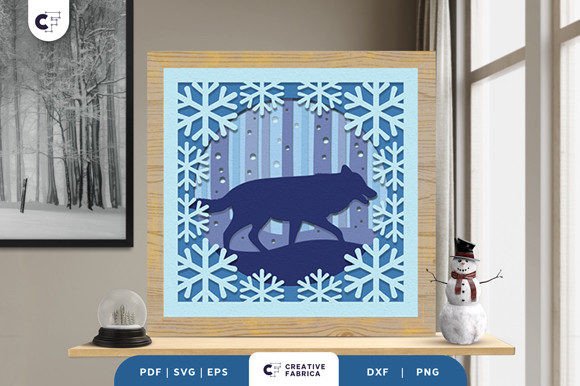
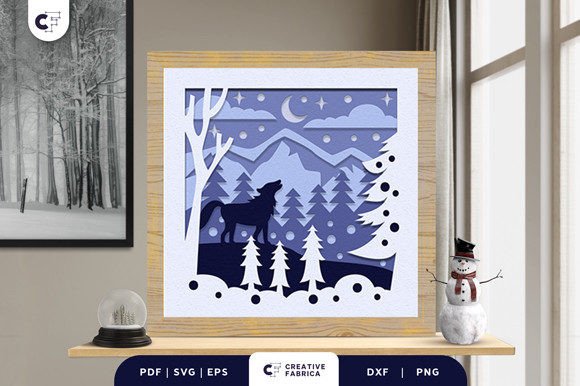
If you're a fan of winter landscapes and wildlife, the Wolf Winter Forest 3D Paper Cut SVG is an ideal project to add to your creative collection. This intricate design brings the quiet beauty of a snowy forest to life with a wolf standing in the center, surrounded by detailed tree silhouettes and snowflakes. The 3D effect adds depth and dimension, making it a stunning piece of art that can be displayed in any space.
The Wolf Winter Forest 3D Shadow Box is more than just a craft project—it’s a way to express your love for nature and creativity. Whether you’re a beginner or an experienced crafter, this design offers a rewarding experience that results in a unique and eye-catching artwork. With the right tools and materials, you can bring this design to life and enjoy the satisfaction of creating something beautiful with your own hands.
What You Need to Create the Wolf Winter Forest 3D Paper Cut SVG
To start, you’ll need a cutting machine such as a Cricut or Silhouette. These machines are essential for accurately cutting out the intricate layers of the design. If you don’t have one, consider renting or using a local makerspace to access the necessary equipment. Once you have the machine, you’ll need 3D adhesive like foam double-sided tape to create the layered effect. This helps the different elements of the design stand out and gives the final product a more realistic look.
Optional additions like a decorative frame and LED lights can enhance the visual appeal of the finished shadow box. LED lights, for example, can illuminate the background and make the design more dramatic, especially when displayed at night. However, these are not required—many people enjoy the design without them, relying on natural light or ambient lighting instead.
Understanding the File Formats and Design Details
The Wolf Winter Forest 3D Paper Cut SVG comes in multiple file formats, including SVG, PDF, EPS, PNG, and DXF. This variety ensures compatibility with different software and cutting machines, making it easier for users to choose the format that works best for their setup. Each file includes six layers, allowing for the 3D effect that makes this design so special.
The dimensions of the design are 20.32×20.32 cm, which is a standard size for many shadow boxes. Before starting, make sure your materials match this size to avoid any fitting issues. The design uses Encore Cardstock 80 lb cover (216 gsm), which provides a sturdy base for the layers and helps maintain the structure of the 3D elements.
Common Mistakes and How to Avoid Them
One common mistake when working with 3D paper cut designs is not properly aligning the layers. If the pieces aren’t stacked correctly, the 3D effect can be lost, and the overall appearance may look flat or uneven. To avoid this, take time to organize the layers and follow the instructions carefully. Some designs come with layer numbers or color codes to help with assembly.
Another issue is using the wrong type of adhesive. While regular glue might work for simple projects, 3D adhesive like foam tape is necessary to lift the layers and create the desired depth. Using the wrong adhesive can result in a less impressive final product. Always check the recommended materials before starting.
Some users also overlook the importance of proper cutting. If the design isn’t cut precisely, the edges may look rough or the pieces may not fit together well. Make sure your blade is sharp and your machine settings are adjusted for the type of material you're using. Testing on a small section first can help prevent errors.
What to Check Before Starting Your Project
Before purchasing or downloading the Wolf Winter Forest 3D Paper Cut SVG, make sure it’s compatible with your cutting machine and software. Different machines may require specific file types or settings, so double-check the requirements. Also, consider the quality of the design—some files may have errors or inconsistencies that can affect the final outcome.
It’s also important to verify the source of the design. While some free files may be available, paid options often provide better quality and support. Be cautious of sites that ask for personal information or seem suspicious. Always look for reviews or feedback from other users to ensure you’re getting a reliable product.
Finally, think about how you plan to display the finished shadow box. Will it be part of a larger display? Do you want to add lighting or a frame? Planning ahead can help you make better choices about materials and design adjustments.
Realistic Examples and Better Approaches
For example, if you’re new to 3D paper cutting, start with a simpler design to build your skills before tackling the Wolf Winter Forest. This will help you become familiar with the process and avoid frustration. You can also experiment with different colors and materials to personalize the design and make it uniquely yours.
If you’re concerned about the cost of materials, consider buying in bulk or looking for sales on cardstock and adhesives. Many online stores offer discounts for larger orders, which can save you money in the long run. Additionally, using recycled materials or repurposing old cards can be a creative and eco-friendly approach.
Final Thoughts on the Wolf Winter Forest 3D Paper Cut SVG
The Wolf Winter Forest 3D Paper Cut SVG is a fantastic project for anyone who loves crafting, nature, or winter themes. It offers a blend of creativity, technical skill, and artistic expression that can be enjoyed by both beginners and experts. By understanding the key elements of the design and avoiding common pitfalls, you can create a beautiful and lasting piece of art.
Take the time to plan your project, choose the right materials, and follow the instructions carefully. With patience and attention to detail, you’ll be able to bring this stunning design to life and enjoy the satisfaction of a well-crafted creation. Whether you display it in your home or give it as a gift, the Wolf Winter Forest 3D Shadow Box is sure to impress and inspire.